PowerShell for Admins

NJ PowerShell Users Group Meeting: Presenter Doug Finke – Microsoft MVP

NJPowerShell
2 min read
Share:

The NJ PowerShell User Group is having a meetup on Thursday, January 8th from 6:00 - 8:00 PM. If interested, please register through the Eventbrite website to track attendance for ordering pizza.  For those attending online (Webex) we will send a follow-up email with the meeting link based on Eventbrite online registrants. Agenda: 6:00 – 6:30: Pizza and socializing 6:30 – 7:30: Presentation 7:30 - 8:00: Q & A

    Please note that the Webex meeting will start at 6:00 PM, but the actual presentation won't start until 6:30

In-Person attendees must register, print out their EventBrite ticket, and present it at the door. Walk-ins will not be permitted.

    **Presenter**: Doug Finke

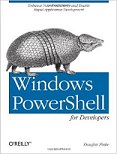
**Bio: **Doug Finke, author of “PowerShell for Developers”, a Microsoft Most Valuable Professional (MVP) for PowerShell and works at Start-Automating, a company specializing in all aspects of PowerShell development, including consulting, training and tool building. Doug has been a developer and author working with numerous technologies. You can catch up with Doug at his blog Development in a Blink at http://dougfinke.com/blog. Microsoft Most Valuable Professional (MVP) Doug Finke takes us through PowerShell from a developer’s point of view. Doug shows techniques for integrating/debugging PowerShell from and to C# code as well as using PowerShell with a Windows Presentation Foundation (WPF) application. He also addresses using reflection at the command line, object pipelining, and PowerShell’s REPL. Plus, time permitting, Doug will highlight some of the new features in the PowerShell v5 November Preview. Twitter:@DFinke Doug Finke    Windows PowerShell for Developers

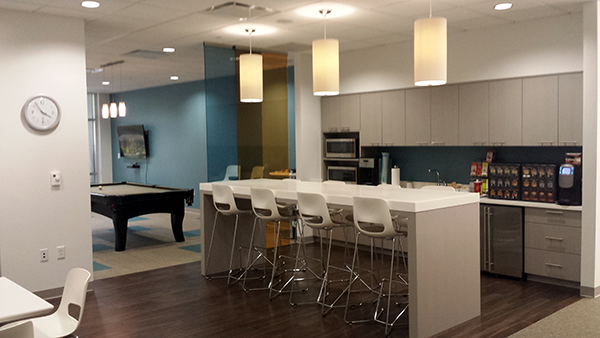
NJ PowerShell Meetup Coffee Bar and Conference room at Mathematica Policy Research
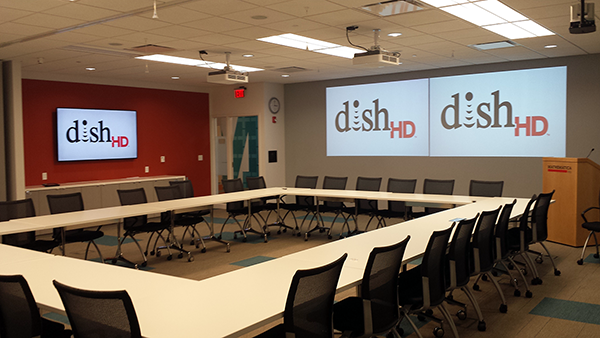
Conference Room

    ![Coffee Bar](https://cdn.evbuc.com/eventlogos/111855199/eventbritecoffeebar.png)

Related Articles

Sep 15, 2023

PowerShell Escape Room

PowerShell Escape Room by Michiel Hamers

by Michiel Hamers
https://about.me/michielhamers/

Why on earth you want to create an Escape Room with PowerShell as backend?

I’ve always been a fan of escape rooms, so I decided to create my own for my kids. I wanted to make it something that would be challenging and fun for them, but also educational. I decided to use PowerShell as the backend for the escape room, as I’m a PowerShell developer and I thought it would be a great way to learn more about the language.
The first step was to design the rooms. I wanted to make sure that there were a variety of puzzles and challenges that my kids would have to solve. I also wanted to make sure that the rooms were visually appealing and engaging. Once I had the rooms designed, I started building them.
I used a variety of materials to build the rooms, including wood, cardboard, and fabric. I also used a few electronic components, such as a USB extension cable with a switch and a 3-button keyboard. The USB extension cable with a switch was used to create a physical button that my kids could press to solve one of the puzzles. The 3-button keyboard was used to enter the code that my kids had to find to solve another puzzle.
I also used a few websites to create rebus puzzles that my kids had to solve. I printed out the rebus puzzles and placed them around the rooms. Once my kids had solved all of the puzzles, they were able to enter the code on a single screen to escape the room.
In this blog post, we’ll delve into the process of creating an engaging PowerShell escape room for the global PowerShell community. We’ll emphasize the significance of storytelling and provide a detailed breakdown of the PowerShell structure used for the escape room.

Sep 15, 2023

Microsoft Graph PowerShell Module: Getting Started Guide

Microsoft Graph PowerShell Module: Getting Started Guide

by Jeff Brown

Microsoft is retiring the Azure AD Graph API sometime after June 30, 2023 (announcement). This retirement includes the Azure AD PowerShell module. In its place, Microsoft has released the Microsoft Graph PowerShell module. The Microsoft Graph PowerShell module is the next-generation way of managing Microsoft cloud services using PowerShell. If you have used MSOnline or Azure AD PowerShell in the past, you’ll need to read on to learn about this new module.

Oct 8, 2021

ICYMI: PowerShell Week of 08-October-2021

Topics include VMWare, Windows 11, Web Reports and more…

Special thanks to Robin Dadswell, Prasoon Karunan V, Kiran Patnayakuni and Kevin Laux

How to gather your vCenter inventory data with this VMware PowerShell script

by Scott Matteson on 7th October

Inventory reports are a common request when administering a VMware vCenter environment. Learn how this VMware PowerShell script can make such requests quick and easy

Building a Web Report in PowerShell, use the -Force Luke

by Chris Noring on 8th October