Survey Results: Source Control for the IT Professional
First off - thank you to everyone who participated in the version control survey!
We’ve had a fun few weeks - Somehow the PowerShell Summit, Build, and Ignite were scheduled back-to-back-to-back. Among a host of other announcements and tidbits, we found that Microsoft has open sourced the DSC resources on GitHub, that Pester will be included in Windows, and saw a cool demonstration from Steven Murawski on using Test Kitchen to test DSC resources.
These and other solutions and technologies are starting to assume you know how to use source control, and many require having a source control solution in place - how do you automate testing and deployment on a commit, if you have nothing to commit to?
Source control has long been an important component of IT, but it seems IT professionals, particularly those in Microsoft environments, aren’t consistently using it.
You might expect a gap between IT professionals and developers, but less than 50% of IT pro respondents used source control as a team.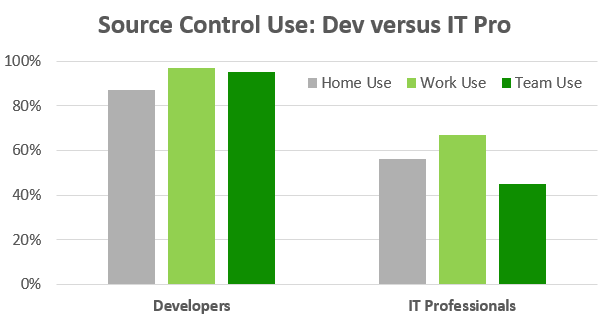
Breaking down the IT professional population by environment, we see that Microsoft environments are even further behind. Many PowerShell aficionados work on teams that aren’t using version control.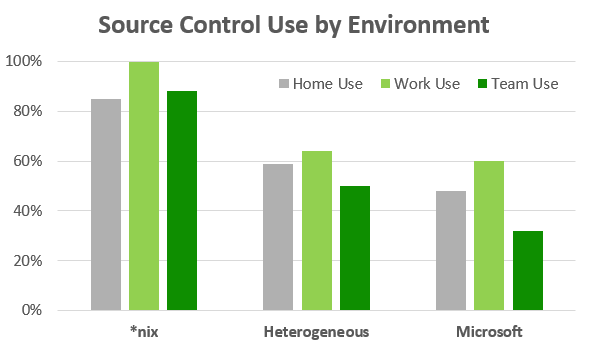
Long story short? IT professionals, management, and vendors have work to do; these new tools and ideas that rely on source control are great, but we need to work on finding a horse for the cart. The rest of my rambling analysis can be found here.
If you want to get up and running quickly, consider using GitHub for your PowerShell projects. You can start with the easy-to-use GUI client, and drop into the command line when you want to get your hands dirty. It’s a great way to start learning about source control, and to get involved in the community.
Do you have any suggestions on how we can get to a place where using source control is common place for IT professionals? Is this a worthwhile goal? Sound off in the comments!
Related Articles
PowerShell Escape Room
PowerShell Escape Room by Michiel Hamers by Michiel Hamers https://about.me/michielhamers/ Why on earth you want to create an Escape Room with PowerShell as backend? I’ve always been a fan of escape rooms, so I decided to create my own for my kids. I wanted to make it something that would be challenging and fun for them, but also educational. I decided to use PowerShell as the backend for the escape room, as I’m a PowerShell developer and I thought it would be a great way to learn more about the language.
Microsoft Graph PowerShell Module: Getting Started Guide
Microsoft Graph PowerShell Module: Getting Started Guide by Jeff Brown Microsoft is retiring the Azure AD Graph API sometime after June 30, 2023 (announcement). This retirement includes the Azure AD PowerShell module. In its place, Microsoft has released the Microsoft Graph PowerShell module. The Microsoft Graph PowerShell module is the next-generation way of managing Microsoft cloud services using PowerShell. If you have used MSOnline or Azure AD PowerShell in the past, you’ll need to read on to learn about this new module.
ICYMI: PowerShell Week of 08-October-2021
Topics include VMWare, Windows 11, Web Reports and more… Special thanks to Robin Dadswell, Prasoon Karunan V, Kiran Patnayakuni and Kevin Laux How to gather your vCenter inventory data with this VMware PowerShell script by Scott Matteson on 7th October Inventory reports are a common request when administering a VMware vCenter environment. Learn how this VMware PowerShell script can make such requests quick and easy Building a Web Report in PowerShell, use the -Force Luke by Chris Noring on 8th October