
Keeping it simple – Line breaks in PowerShell

Trying to get your code to look good when reading it later can be tricky
For line breaks in function scripts, there are two out-of-the-box options:
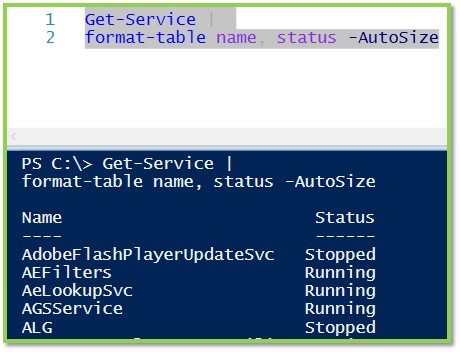
First, you can break a line after the pipe key, which is an elegant and easy-to-read approach.
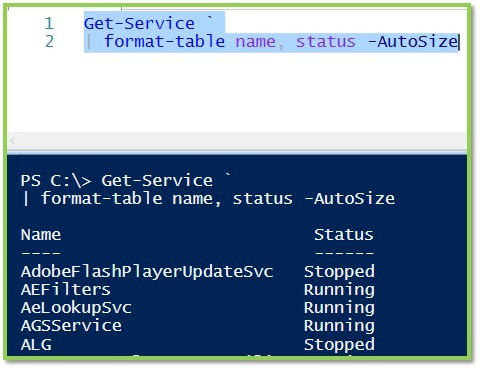
Second, you can arbitrarily break a line with a back tick mark, which you will find left of the number 1 on a standard US keyboard.
**It looks like this: ** But did you know that the back tick is a hack? The back tick means, “literally interpret the next character,” or also said, escape the following character.”
For example, you might want to literally reference a quotation mark “ in a path name, but because it’s inside “” for strings, you need to literally interpret it: “”PATH”” – it’s hard to see, but squint.
But here’s another takeaway: if you use the back tick to create a line break, make sure there’s no space after it; otherwise, the space – not the carriage return – will be the escaped, literal character!
So here’s are some examples of what works and what doesn’t:
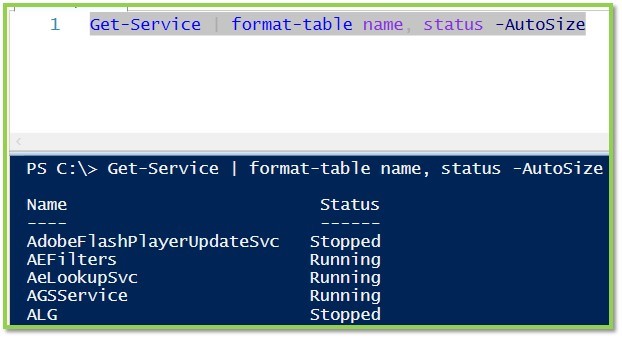
First, no line breaks - works like a charm, but if we add a few more pipes and parameters this could get ugly.
Next we have an example with a line break after the pipe, also functioning normally
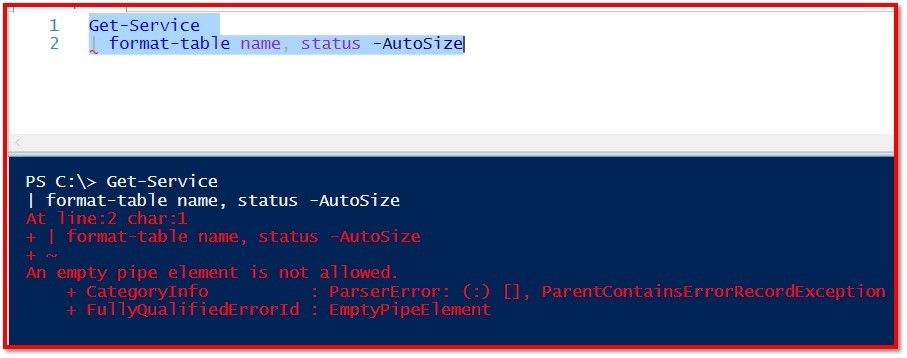
Here we see the line break before the pipe, and the script fails
In this sample we use the tick immediately followed by a return. If we wanted to we could insert these ticks numerous times, before each parameter, for example
Finally we see the effect of using the back tick AND A SPACE before the carriage return - this one is tricky to find when troubleshooting, so don’t let it happen to you!

A special thanks to Sarah Wischmeyer for the introductory comments on this one!
Keep your scripts snappy!
Related Articles
Find Free Azure CIDR Blocks with PowerShell
Suppose the network team assigns 10.172.0.0/16 to an Azure landing zone. You need to divide it into correctly aligned virtual …
Read moreHow to Toggle Logon Restrictions for AD Accounts
Written by Tino JR This script will allow an administrator to enable or disable logon restrictions for an Active Directory …
Read morePowerShell Escape Room
PowerShell Escape Room by Michiel Hamers by Michiel Hamers https://about.me/michielhamers/ Why on earth you want to create an …
Read more