Making Awesome Dashboards from Windows Performance Counters
Having an understanding of your systems performance is a crucial part of running IT infrastructure.
If a user comes to us and says “why is my application running slowly?”, where do we start? Is it their machine? Is it the database server? Is it the file server?
The first thing we usually do is open up perfmon.exe and take a look at some performance counters. You then see the CPU on the database server is 100% and think _ “was the CPU always at 100% or did this issue just start today? Was it something I changed? If only I could see what was happening at this time yesterday when the application was running fine!". _It might take you a few hours to find the performance issue on your infrastructure, and you are probably going to need to open up perfmon.exe on a couple of other systems. There is a better way!
What if you could turn your Windows performance counters into dashboards that look like this? How much time would you save?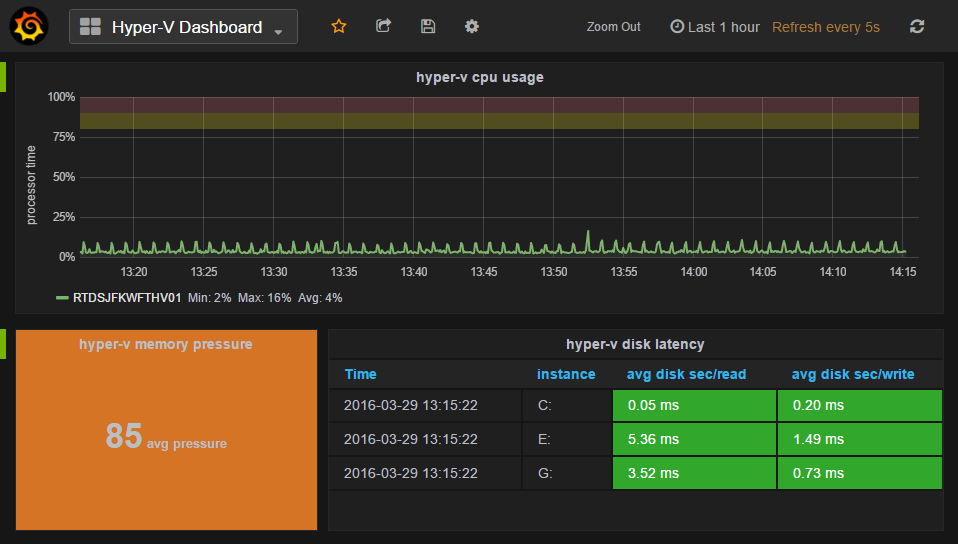
Using a combination of the open source tools InfluxDB to store the performance counter data, **Grafana **to graph the data and the Telegraf agent to collect Windows performance counters, you will be a master of your metrics in no time!
Read the detailed walk through over at hodgkins.io
Related Articles
Connect to all Office 365 Services with PowerShell
If you are not on Office 365 or have a tenant set up with Microsoft yet, now is the time to reserve your tenant name! With utilizing Office 365, a lot of administration is only available from a PowerShell session. There is a mix of outdated information on what you actually need to install and execute in order to connect to all of the Office 365 services. As a result, I accumulated and wrote up the current download requirements and commands to connect and administer every Office 365 service from one PowerShell session.
Using PowerShell to enable ChatOps on Windows
ChatOps is a term used to describe bringing development or operations work that is already happening in the background into a common chat room. It involves having everyone in the team in a single chat room, then bringing tools into the room so everyone can automate, collaborate and see how automation is used to solve problems. In doing so, you are unifying the communication about what work gets done and have a history of it happening.
Improve Delivery of PowerShell Tools or Version Controlled Files
I am back this week with a quick how-to article on delivering, installing, or launching version controlled files. In the past I ran into problems when having administrators launch my PowerShell tools from a network share. The performance was slow when launching it across the WAN, and the file would often be locked when I tried to replace it with a newer version. I came up with a solution to the problem by using none other than PowerShell.